Latest Blog Posts
All Your GUCs in a Row: ignore_system_indexes
Posted by Christophe Pettus in pgExperts on 2026-08-08 at 01:00
Looking Forward to Postgres 19: Syntax Potpourri
Posted by Shaun Thomas in pgEdge on 2026-08-07 at 10:41
Before diving into this final post covering new Postgres 19 features, I just want to say it's been a wild ride. Postgres 19 has been a veritable treasure trove of enhancements, perhaps more than any previous release; or maybe that's just my perception. Usually I just skim through the release notes and nod along, sometimes jotting down things that look interesting for later study. Maybe calling out each element that caught my eye was the right thing to do, to really show how far Postgres has come since the last release, rather than simply accepting the status quo. It's easy to miss an otherwise innocuous one-liner in a changelog.In any case, every major Postgres release ships with a marquee feature or two, and I've covered several of them in this series on Postgres 19. Some will garner dedicated conference talks or a flurry of frantic blogs from equally zealous authors. The big-ticket items always get their time in the spotlight. But I'm not here to talk about that this week. Like the last article on a handful of unassuming new function calls, this week will focus on some syntax tweaks that may never really trend anywhere—the lost and unsung.Why dedicate a whole article to syntactic sugar? Why fuss over features that, taken one at a time, save maybe four lines of SQL apiece? Because four lines of SQL, multiplied across every project we'll ever touch, becomes a veritable mountain of saved aggravation. Postgres 19 happens to bring a whole potpourri of these, and a few of them scratch itches I didn't even know I had.Let's wander through my notes and see what turned up.
Something Old, Something New
Prior to the newer MERGE syntax, the humble ON CONFLICT clause was the Postgres Way™ to combine and into a single statement. It can and shrug off the duplicate, or and merge new values into the old row. That's still its primary role.But there's a third thing we want constantly, and Postgres never had a clean way to express it: get-or-create. Insert this row if it's new, and either way, return the row that's there[...]Contributions for week 29 & 30
Posted by Cornelia Biacsics in postgres-contrib.org on 2026-08-07 at 09:09
The Talk Selection Committee of PGConf.EU 2026 met to finalize the conference schedule:
- Samed Yildirim (Non-Voting Chair)
- Floor Drees
- Gülçin Yıldırım Jelinek
- Jan Wieremjewicz
- Mayuresh Bagayatkar
- Andrei Lepikhov
- Jan Karremans
- Priyanka Chatterjee
- Stefanie Janine Stölting
On 22 July 2026, the PostgreSQL Down Under Meetup met, organized by David Micallef. Gabriele Bartolini delivered a talk.
On 22 July 2026, the Adelaide PostgreSQL User Group met, organized by Robins Tharakan.
Speakers:
- Eugene Bobkov
- Robins Tharakan
On 22 July , 2026 the Sydney PostgreSQL User Group met, organized by:
- Roneel Kumar
- Rajni Baliyan
- Malcolm McLean
- Shadab Mohammad
Speakers:
- Peter Smith
- Siraj Jamdar
Multi-media contributions
- On Friday, 24 July, Pavlo Golub published a video with the title WAWTech+Summer 2026
- On Friday, 31 July, Pavlo Golub published a video about the inaugural Meetup in Istanbul
All Your GUCs in a Row: ignore_invalid_pages
Posted by Christophe Pettus in pgExperts on 2026-08-07 at 01:00
PostgreSQL Row-Level Security for AI Agents: A Testable Setup
Posted by Andrei Mironov on 2026-08-07 at 00:00
initial integration lua language to psql
Posted by Pavel Stehule on 2026-08-06 at 15:48
(2026-08-06 17:44:32) postgres=# \luacode
Enter code to be copied followed by a newline.
End with a backslash and a period on a line by itself, or an EOF signal.
>> function x(n)
>>   return n + 10
>> end
>> \.
(2026-08-06 17:45:32) postgres=# \luacode
Enter code to be copied followed by a newline.
End with a backslash and a period on a line by itself, or an EOF signal.
>> print (x(10))
>> \.
20
ORBIT: An Execution Framework for Reliable Enterprise AI
Posted by Vibhor Kumar on 2026-08-06 at 12:35
Why AI Reliability Is an Execution Problem, Not a Model Problem

The most dangerous AI decision isn’t the wrong one. It’s the one nobody can explain afterward.
Most conversations about AI reliability start in the wrong place. They start with the model — its accuracy, its reasoning quality, its benchmark scores — as if reliability were something a better model eventually solves. It isn’t. A model can retrieve the right documents, reason correctly, and select the right action, and the system built around it can still fail in ways that have nothing to do with intelligence at all. A network times out. A worker restarts mid-task. A message arrives twice. A process crashes after changing state but before recording that it did.
None of these are model problems. They are execution problems — the same problems distributed systems have wrestled with for decades, now arriving at the doorstep of AI because agentic systems finally do enough real-world work for the failure modes to matter.
That’s why I believe the next decade of AI engineering will look increasingly like the last two decades of distributed systems engineering. The novelty won’t be in handling model responses. It will be in making those responses durable, coordinated, recoverable, and accountable inside production systems.
This is the premise behind ORBIT: an execution discipline for AI systems that retrieve, reason, and act. Five principles — Outbox First, Rate & Shared State, Background Is the Unit of Execution, Idempotency from Day One, and Trace Everything — that don’t ask whether a model reasoned well. They ask whether the system around it can be trusted to execute what the model decided, survive the failures that will inevitably occur, and be understood afterward by the humans accountable for what happened.
Why demos don’t survive contact with production

A demo proves that an AI system can reason. Production has to prove something harder: that the entire workflow can recover when networks fail, services restart, mes
[...]Postgres for Agentic AI: Your Database Is a Compute Layer, Not a Parking Lot
Posted by Antony Pegg in pgEdge on 2026-08-06 at 12:20
PostgreSQL is already the default database for agentic AI. That question is settled. But the more agentic your workloads get, the more your database needs to do. Models and workflows flood it with signals, state, memory, and checkpoints, and most teams just absorb the flood, treating PostgreSQL like a parking lot rather than a compute layer. The people building these systems are AI engineers, not database people. They haven't explored what PostgreSQL can actually do when you treat it as a first-class compute citizen. Production agentic AI creates workload patterns that look nothing like anything most teams have operated before. Agents write intermediate results, update shared state, run concurrent multi-step workflows against the same tables, and do all of this without coordinating with each other. Your chatbot is pulling RAG context from a table that a data-cleaning agent is actively updating, while a forecasting agent parks half-finished calculations in a scratch table that three other processes read from.The demos look great, but the architecture decisions at the database layer determine whether your agents run reliably at scale or whether you spend Monday mornings untangling a mess that autonomous processes made over the weekend.
What Agents Actually Do to a Database
Agentic AI workloads split along a line most teams don't draw clearly enough: the difference between agent memory (what the agent knows and recalls across sessions) and agent state (the checkpoints, scratchpads, and coordination data that keeps a workflow running). Princeton's CoALA framework formalized this taxonomy, and Harrison Chase has argued that agent memory creates durable lock-in you shouldn't cede to your model provider. These essentially map to four database patterns, each putting different pressure on PostgreSQL.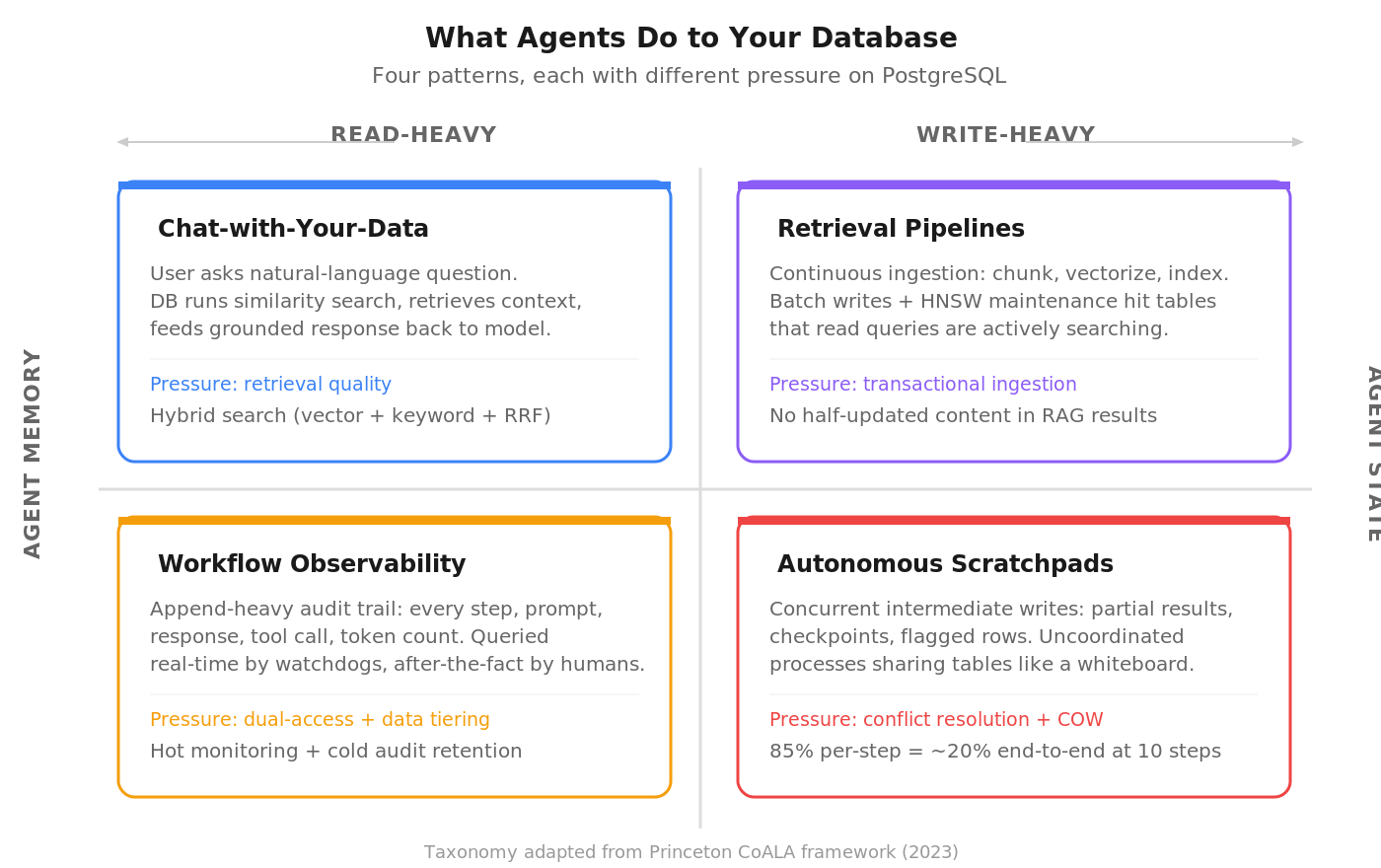 Chat-with-your-data is where most teams start. A user asks a question in natural language, the database runs a similarity search against stored vectors, retrieves relevant context, and feeds it back to the model for a g[...]
CNPG Recipe 26 - Extension image catalogs
Posted by Gabriele Bartolini in EDB on 2026-08-06 at 11:48
CloudNativePG lets the ClusterImageCatalog carry extension images alongside the operand, a capability every currently supported release already has, so a Cluster manifest only needs to name an extension and nothing else. This recipe deploys the community’s extension catalog and shows the operator resolving pgvector’s image, paths and dependencies from a single, versioned source of truth per PostgreSQL major version. More importantly, it is the piece of infrastructure that turns extension distribution into a real ecosystem: once an extension lands in the catalog, every Cluster that references it inherits it for free, with no manifest ever needing to change again.
EXPLAIN ANALYZE the PGConf.EU CFP
Posted by Mayur B. on 2026-08-06 at 07:20
What I learned after moving from conference volunteer duty to the other side of the Call for Papers.
Disclosure: This is my personal account of the experience, based on the publicly documented PostgreSQL Europe selection process and aggregate statistical analysis. I am intentionally not discussing individual proposals, speakers, scores, committee comments, private conversations, or confidential data.
I cannot say with certainty why I was invited. My best guess is pleasantly unromantic: an invitation to apply was sent to previous conference volunteers, and I had volunteered at several recent PGConfEU events. I applied, and apparently nobody found a sufficiently alarming reason to reject me.
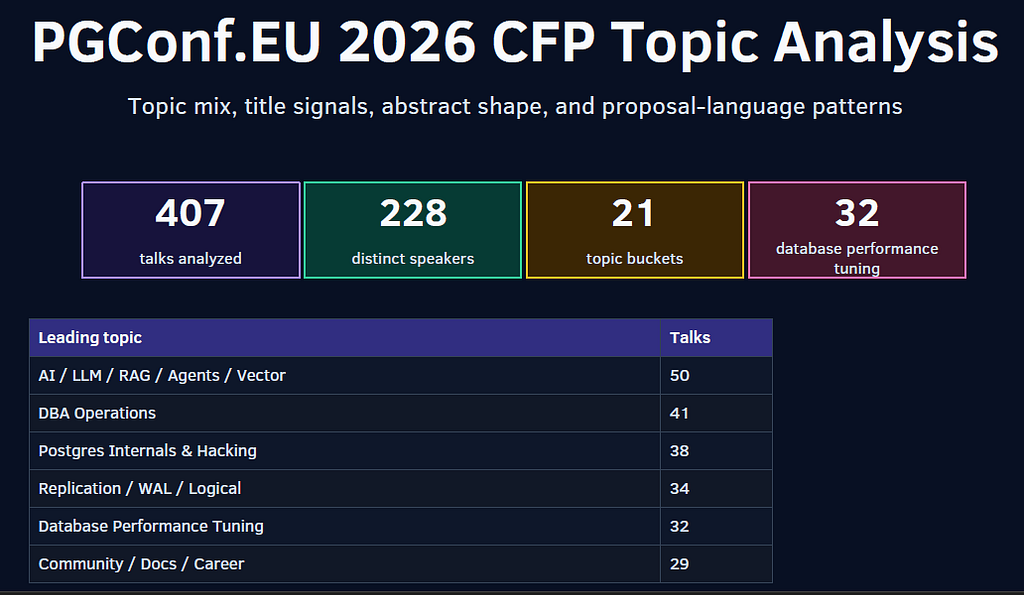
The Long-Running CFP Query: 407 Abstracts, Two Voting Tracks, and Three Cities by Train
Topic groups were created for this post-selection analysis (for this blog only) from the primary subject of each proposal; they are not official PGConf.EU categories.
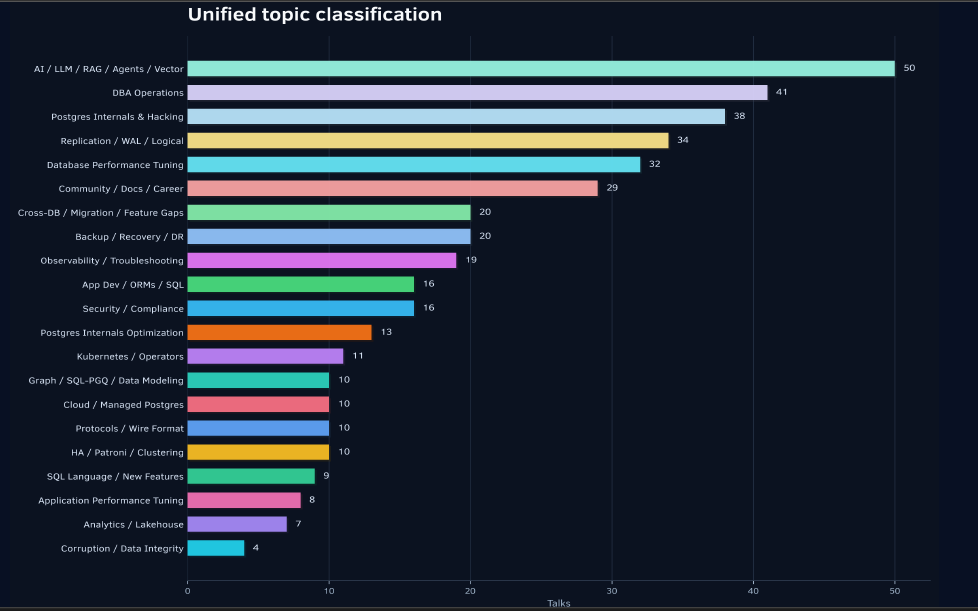
The review scope
The PGConf.EU 2026 CFP contained 407 submissions from 228 distinct speakers. I read and voted on every one of them, although my votes were needed only in the two tracks assigned to me:
Application Developer
Community
That arrangement made sense. Reading the full submission pool gave me context across the CFP, while having two assigned tracks allowed me to examine those proposals in much greater depth.
My review process usually began with the abstract. I then checked the CFP notes for supporting material such as code, slides, recordings, or a related blog post. When none was provided, I searched previous PostgreSQL conferences, PGdays, and meetups to see whether the talk or an earlier version of it had already been presented. There are enough PostgreSQL events during the year that this occasionally felt less like reviewing and more like conference archaeology.
All Your GUCs in a Row: ignore_checksum_failure
Posted by Christophe Pettus in pgExperts on 2026-08-06 at 01:00
The DISTINCT in your COUNT
Posted by Radim Marek on 2026-08-05 at 21:00
Here is a query that shows up in every analytics workload:
SELECT count(DISTINCT user_id) FROM events;
It looks like the cheapest possible thing: count the distinct users. On a machine with cores to spare you would expect Postgres to throw a few parallel workers at it, the way it does for almost any large scan. It does not. That one keyword, DISTINCT, switches off parallel query for the entire statement, and the larger your table the more it costs you. No setting or index changes that; the reason is in how the aggregate has to execute.
The schema
Ten million events, about fifty thousand distinct users, a handful of countries. Nothing unusual.
CREATE TABLE events (
    id      bigint GENERATED ALWAYS AS IDENTITY,
    user_id int    NOT NULL,
    country text   NOT NULL,
    amount  numeric(10,2) NOT NULL
);

INSERT INTO events (user_id, country, amount)
SELECT (random()*50000)::int + 1,
       (ARRAY['US','DE','GB','FR','JP','BR','IN','CA'])[(random()*7)::int + 1],
       (random()*500)::numeric(10,2)
FROM generate_series(1, 10000000);

ANALYZE events;
max_parallel_workers_per_gather is at its default of 2 on fresh cluster. For these examples I raised it to 4 and work_mem to 64MB, so there's no resource starvation to blame for the plans below.
Two counts, two different plans
Start with a plain count(*), which has nothing to deduplicate:
EXPLAIN (ANALYZE, COSTS OFF) SELECT count(*) FROM events; Finalize Aggregate (actual rows=1.00 loops=1)
-> Gather (actual rows=5.00 loops=1)
Workers Planned: 4
Workers Launched: 4
-> Partial Aggregate (actual rows=1.00 loops=5)
-> Parallel Seq Scan on events (actual rows=2000000.00 loops=5)
Four workers plus the leader (loops=5) each scan their slice and keep a running count, and the leader adds the five partial counts together at the end.
Now add one word:
EXPLAIN (ANALYZE, COSTS OFF, BUFFERS) SELECT count(DISTINCT user_id) FROM events; Aggregate (actual rows=1.00 loops=1)
Buffers: shared hit=Ontogeny Recapitulates the Relcache
Posted by Christophe Pettus in pgExperts on 2026-08-05 at 16:09
Tuning PostgreSQL HOT Updates - A HammerDB Benchmark
Posted by Avi Vallarapu in HexaCluster on 2026-08-05 at 09:12
All Your GUCs in a Row: idle_session_timeout
Posted by Christophe Pettus in pgExperts on 2026-08-05 at 01:00
Mastering PostgreSQL Configuration Management with CloudNativePG (CNPG)
Posted by Wellingtone Luvonga in Cybertec on 2026-08-04 at 05:00
If you are a traditional database administrator (DBA) transitioning to Kubernetes, the cloud-native ecosystem can feel like a series of personal attacks on your workflow.
For years, your terminal was your home. If a query was running slow, you SSH’d into the VM, opened /var/lib/pgsql/data/postgresql.conf in vim, bumped up shared_buffers, and ran a quick pg_ctl reload. If you needed to lock down access for a new application server, you hopped into pg_hba.conf, appended a new host rule, and went about your day.
Then came Kubernetes. No SSH. No direct file access. Pods are ephemeral, and manually editing files inside a container is a capital offense in the world of GitOps.
Naturally, you’re asking: "How on earth am I supposed to tune my buffers and manage client authentication if I can't touch the configuration files?"
Enter CloudNativePG (CNPG). In this post, we will look at how this enterprise-grade Postgres operator translates declarative Kubernetes YAML into optimized, production-ready Postgres settings and why this "hands-off" approach is actually the best thing to ever happen to your database configuration.
The Mental Shift: Imperative vs. Declarative
In a traditional environment, configuration is imperative: you run commands and edit files directly to achieve a desired state.In Kubernetes, configuration is declarative: you write down what you want the final state to look like in a YAML file, and the operator (CNPG) works tirelessly in the background to make it happen.
| Action | Traditional VM Way | The Cloud-Native Way (CNPG) |
| Edit postgresql.conf | SSH + manually edit the text file. | Update spec.postgresql.parameters in YAML. |
| Edit pg_hba.conf | Append host rules to the file on disk. | Update spec.postgresql |
All Your GUCs in a Row: idle_replication_slot_timeout
Posted by Christophe Pettus in pgExperts on 2026-08-04 at 01:00
PostgreSQL Lockup vs Stale Connection: How to Tell Them Apart
Posted by Umair Shahid in Stormatics on 2026-08-03 at 15:33
“The database is locked up.” We heard some version of that sentence more than once this past week, from the same team, about what looked like the same problem. It was not the same problem. Once, Postgres had genuinely stopped responding. Every other time, Postgres was fine, and a connection sitting in the application’s pool had quietly died somewhere between the app and the database.
Both failures produce the same page at 2am: the app cannot reach the database. Only one of them means the database is actually in trouble. Mixing the two up costs you the most expensive resource in an incident, which is the first ten minutes, when you are still deciding what kind of problem you have.
A true PostgreSQL lockup means the server itself has stopped responding at the operating system level. You cannot open a new session against it, from any client, from anywhere. A stale connection problem means Postgres is healthy and reachable. The trouble is a specific connection already sitting in your application’s pool, pointed at a socket that died somewhere along the way, usually without either side getting a clean signal that it happened.
What a true lockup actually looks like
This one is rare, and when it happens, it is unambiguous. Every attempt to open a fresh session hangs or refuses, including a brand new psql connection run directly on the box. It does not matter which application, which pool, or which network path you try. Nothing gets in.
The usual causes sit below Postgres itself: the OS is out of memory and the kernel is reclaiming pages, a storage volume has stopped responding to I/O, or a runaway process has pinned every CPU core hard enough that even accepting a new connection cannot get scheduled. Whatever the trigger, the signature is consistent. Existing sessions may still be limping along, but nothing new can start.
What a stale connection actually looks like
This one is far more common, and it hides well because it looks identical from the app’s point of view. Somewhere between your
[...]All Your GUCs in a Row: idle_in_transaction_session_timeout
Posted by Christophe Pettus in pgExperts on 2026-08-03 at 01:00
All Your GUCs in a Row: ident_file
Posted by Christophe Pettus in pgExperts on 2026-08-02 at 01:00
All Your GUCs in a Row: hot_standby_feedback
Posted by Christophe Pettus in pgExperts on 2026-08-01 at 01:00
Your Transaction Boundary Belongs in the Program, Not the Filename
Posted by Alexey Evlampiev on 2026-08-01 at 00:00
Your Transaction Boundary Belongs in the Program, Not the Filename#
A phased schema change spans transactional and non-transactional work. Most migration frameworks express that distinction as metadata; pgmi makes it part of the SQL program.
By Alexey Evlampiev
Three facts about PostgreSQL decide how a deployment has to be shaped, and all three are the server’s rules rather than any tool’s.
A table-level lock is held until the end of the transaction that took it, not until the statement finishes — so a six-millisecond ALTER TABLE at the top of a five-minute transaction blocks readers for five minutes. lock_timeout bounds how long a statement waits for a lock, which is a different quantity again. And CREATE INDEX CONCURRENTLY, the statement you reach for precisely because it does not block reads or writes, refuses to run inside a transaction block at all — and refuses a second way, from inside any function, procedure or DO block, with a different error:
Your ALTER TABLE Is Fast. The Queue Behind It Is Not.
Posted by Alexey Evlampiev on 2026-08-01 at 00:00
Your ALTER TABLE Is Fast. The Queue Behind It Is Not.#
A schema change that runs in six milliseconds can still stop every read on the table for sixteen seconds — the damage is done by waiting, not by working.
By Alexey Evlampiev
Here is the same statement, run twice against the same table — PostgreSQL 16.14 in a local container, an orders table of 100,000 rows, the contending session held open with pg_sleep. These are illustrative numbers from one machine, not a benchmark; the ratio is the point, and you can reproduce it in about a minute.
Postgres COUNT(DISTINCT) Too Slow? Fast Approximation Guide
Posted by Elizabeth Garrett Christensen in Snowflake on 2026-07-31 at 22:49
That's 320 milliseconds vs 671 ms for exact COUNT(DISTINCT) which is about twice as fast on a single scan. Also HLL isn't just about raw speed on one query. The function names are a bit verbose but the pattern is always the same: hash the value, aggregate the hashes into an HLL, then ask for the cardinality.
Preaggregate for instant queries
The real power of HLL is that sketches are mergeable. This is the key concept that makes them different from just "a faster COUNT(DISTINCT)." You can build a separate HLL sketch for each day, store those sketches in a table, and then union them together at query time to get distinct counts across any date range.
The daily_hll table has one row per day. Each row is tiny — the HLL column in this example is about 1.3 KB per row regardless of how many users it represents. And querying this small rollup table instead of scanning millions of raw rows is what gets you from hundreds of milliseconds to sub-millisecond.
HLL sketches work as window functions too, making rolling unique counts trivial:
| TABLESAMPLE | HLL (postgresql-hll) | DataSketches | |
|---|---|---|---|
| What it does | Reads a random subset of rows | Distinct counting | Distinct counting, set ops, quantiles, heavy hitters |
| Extension required | No (built-in since PG 9.5) |
hll
|
datasketches
|
| Precomputable | No (scan-time only) | Yes | Yes |
| Mergeable | No |
Yes (hll_union_agg)
|
Yes (all sketch types) |
| Distinct counts | Poor (overcounts when extrapolated) | Yes | Yes (CPC, Theta) |
Performance Farm July 2026 Update
Posted by Mark Wong on 2026-07-31 at 19:29
The PostgreSQL Performance Farm is still not quite a reality, but I think there is some hope on the horizon.
After some discussions with various folks at AWS about large scale OLTP testing with PostgreSQL on EC2, I was introduced to Farrah Campbell last spring who has been helping open source software maintainers. She hooked me up with some credits that I used to sign up for Kiro Powers. It's been quite a while since I have done any significant performance testing and the OLTP test kits we developed back in the OSDL days could use some updating, in particular this DBT-5 kit.
Shortly after that, I caught up with Mila Zhou about the AWS Open Source Credits Program because doing any large scale OLTP testing in the cloud is going to take a serious amount of credits. As luck would have it, I was granted enough credits to start working on sizing up a system.
I'm currently thinking a TPC-E-like workload might be a good stress test for PostgreSQL on EC2 with its more balance i/o to processing requirements compared to a TPC-C, so I've started sizing up a r5b.4xlarge instance type with as many block devices as it can attach to
Keep an eye out here and on Blue Sky as I start posting updates over the coming weeks.
Waiting for PostgreSQL 19 – SQL Property Graph Queries (SQL/PGQ)
Posted by Hubert 'depesz' Lubaczewski on 2026-07-31 at 16:57
Hacking Workshop for September 2026
Posted by Robert Haas in EDB on 2026-07-31 at 15:09
I'm pleased to announce that David Rowley will be joining us in September to discuss his talk Optimizing code in the hot path; with examples from tuple deformation. If you're interesting in joining us, please sign up using this form and I will send you an invite to one of the sessions. As always, thanks to David for agreeing to join the sessions.
Read more »PostgreSQL 18's extension_control_path: Decoupling Extensions from Server Images
Posted by Muhammad Aqeel in pgEdge on 2026-07-31 at 10:08
PostgreSQL 18 adds a Grand Unified Configuration (GUC), , that lets an extension's control and SQL files live outside the server's own directories. Together with Kubernetes's ImageVolume and Docker's , that makes it practical to package an extension as its own small OCI container image and mount it into the PostgreSQL pod at runtime, without rebuilding the server image.The idea is compelling. A fleet of clusters sharing one lean, unmodified PostgreSQL image. Extensions versioned and upgraded independently. pgvector 0.8 today, 0.9 tomorrow, without touching the server layer - sounds clean.It is clean - for the right extensions. For others, the container boundary doesn't actually decouple anything meaningful. Whether the extension deserves its own container depends almost entirely on how deeply it is wired into the server's startup sequence, process tree, and storage subsystem. This post maps out that landscape.
What PostgreSQL 18 Actually Changed
Before PostgreSQL 18, already let you place shared libraries (. files) outside the compiled-in . While took care of the binary side of an extension, the gap was the control side: extension control files (.) and SQL scripts had to live in with no override mechanism. Any extension that wasn't installed in the server's own share directory simply could not be found by .PostgreSQL 18 closes that gap by adding - a GUC that works exactly like but for control and SQL files. Set both GUCs together, and an extension can live entirely outside the PostgreSQL installation:One subtlety that tripped us up during testing: takes sharedir-level paths, not the extension subdirectory directly. PostgreSQL appends automatically when scanning for .control files. Specifying the full path to the extension subdirectory silently finds nothing, not even built-in extensions like plpgsql.The placeholder resolves to the compiled in sharedir (the path returned by ). It must appear in extension_control_path or the server loses access to all its own built-in extensions. The same logic appli[...]WAWTech+Summer 2026 [UNLOGGED]
Posted by Pavlo Golub in Cybertec on 2026-07-31 at 10:00
The official logs are still processing, but the raw data is ready.
Welcome to the newest #UNLOGGED drop from WAWTech+Summer 2026 in Warsaw. We traded the classic conference center for an open-air tech festival at Tor Służewiec, and the energy was incredible.
This uncompressed cut captures the pure hallway track reality—setting up the Postgres booth with the international team, taking the stage for my talk on “From Hops to Vectors: Building AI-Powered Beer Recommendations in Postgres,” and the inevitable post-event fast food run.
Skip the WAL. Enjoy the raw feed. Link to the full video on YouTube.
Looking Forward to Postgres 19: The Cult of Functionality
Posted by Shaun Thomas in pgEdge on 2026-07-31 at 09:31
Postgres ships with a genuinely bountiful catalog of built-in functions. There are literally thousands of them, covering everything from trigonometry to JSON path queries to full-text ranking. It's a kitchen sink of staggering proportions. Somehow despite all of that, there are actually still a few gaps to fill.Need a random date for some test data? That's going to be an entire expression, I'm afraid. How about the exact definition of a role, tablespace, or database? You better have a GUI database tool like pgAdmin or access to the command with a little assistance from .It's little annoyances like this that Postgres 19 aims to alleviate. Let's explore these new quality of life enhancements!
In the Near Future
Suppose we want a random date sometime in 2026. The canonical approach for this has been to begin with January 1st and add a random amount of days:It's kind of a hack, but it works. Aside from not accounting for leap years, there's also something else to take note of:We asked for a date and got a , because adding an interval to a date promotes the whole expression. If we actually wanted a , we have to wrap the result in another cast. If we wanted a , that's a different cast. That's not exactly critical, but type sensitivity varies across platforms.Either way, that's a lot of ceremony for "give me a random date."So Postgres 19 adds a family of overloads that take an explicit lower and upper bound. The we all know and love is still around in the mathematical functions, but now there are three new temporal definitions in datetime functions.There's one for each of the valid Postgres date and time types:A random date is now just , and the result is a real . No interval multiplication, trailing cast, or surprise timestamp conversion. Ditto for and . The inclusive bounds also address the issue we had with leap years, where adding 364 days could mean never reaching December 31st.You may have also noticed the matching significant figures in the output. If you haven't ever used that before, it works univer[...]Top posters
Number of posts in the past two months
 Christophe Pettus (pgExperts) - 68
- Shaun Thomas (pgEdge) - 9
- Hans-Juergen Schoenig (Cybertec) - 9
- Vibhor Kumar - 6
- Cornelia Biacsics (postgres-contrib.org) - 6
- Radim Marek - 6
- Alexey Evlampiev - 6
- Antony Pegg (pgEdge) - 5
- Richard Yen - 5
- Andrei Lepikhov (pgEdge) - 5
Top teams
Number of posts in the past two months
- pgExperts - 68
- pgEdge - 23
- Cybertec - 18
- EDB - 13
- Stormatics - 9
- postgres-contrib.org - 6
- PostGIS - 5
- Crunchy Data - 4
- Xata - 3
- Percona - 3
Feeds
Planet
- Policy for being listed on Planet PostgreSQL.
- Add your blog to Planet PostgreSQL.
- List of all subscribed blogs.
- Manage your registration.
Contact
Get in touch with the Planet PostgreSQL administrators at planet at postgresql.org.